
How to Design Your Own Team Jersey Online, Free
October 21, 2026
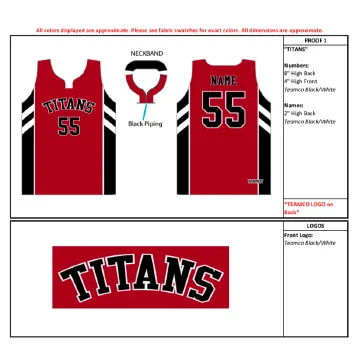
You can design your own team jersey online with TEAMCO, for free. No account is needed. When it looks right, you send it to us for a quote. Here is how it works, step by step.
1. Pick a style
Start in the jersey designer and pick your sport. Every style can be changed, so pick the shape and stripes you like most. Colours come next.
2. Set your colours
Open the Colours tab and pick a colour for each part of the jersey. The jersey on screen changes as you go. Try a few combinations before you decide.
3. Add logos, numbers and names
Open the Logos, Numbers & Names tab. Upload your team logo, then add numbers and player names. You can pick where each logo goes, such as the chest, a sleeve or the back.
Your logos, names and numbers are all included in the price. There is no extra charge per logo.
4. Or just ask Cosmo
Cosmo is our AI designer. Tell it what you want in plain words, like "make it navy and gold" or "put our logo on the left chest". Cosmo makes the change on your jersey for you.
5. Get a quote
Press Get a quote. You can send up to 10 designs in one quote, such as home and away. Each design has a mockup number, like A100123, so we know exactly which one you mean.
We reply with pricing by email.
6. Approve your proof
Before we make anything, we send you a complete artwork proof. Nothing is made until you approve it. Then we make your jerseys in our factory in Markham, Ontario, in about 2 to 3 weeks.
Tips for a great design
- Send a sharp logo. A large, clear logo file prints best.
- Check contrast. Numbers should stand out clearly from the jersey colour.
- Design home and away together. Save both, then send them in one quote.
Ready? Open the jersey designer and start with your sport.